

Customers often ask me whether Microsoft Dynamics 365 Business Central (BC) is suitable for their organization’s size. And my answer is always a resounding “yes!” Why? Because BC is both powerful and adaptable, meaning it can adapt to any company’s size and be “right-sized” for any business.
Growing a business is exciting – but let’s be honest, it can also get messy. As you expand, you might find yourself juggling multiple ERP systems, struggling to keep financial data consistent, or dealing with reporting headaches across different locations.
Sound familiar?
Here at Liberty Grove, we see this all the time. That’s why we help businesses simplify operations using Microsoft Dynamics 365 Business Central (BC) – a flexible, scalable ERP solution that works whether running a single entity SMB or managing multiple branches across the globe.
And guess what? It doesn’t stop there. Power BI is the perfect sidekick, helping you turn raw data into smart, real-time insights. Let’s break down how BC can work for you.
Business Central: Built for Businesses of All Shapes and Sizes
Every company has its quirks, goals, and challenges. BC understands that and offers two powerful ways to manage multi-entity operations:
- All-in-One Consolidation – If you’ve got multiple subsidiaries, BC rolls up financial data seamlessly, giving you a crystal-clear picture of your overall business performance.
- Decentralized but Connected – If you need autonomy for individual locations, BC lets them operate independently while sharing essential transaction data with headquarters.
Oh, and did I mention the automation? BC has built-in tools to streamline treasury management, intercompany transactions, access controls and master data synchronization so you can focus on growth instead of manual processes.
What Today’s Businesses Need – And How BC Delivers
Successful companies rely on fast, accurate data to make decisions. Business Central gives you:
- Real-time operational insights – Keep tabs on multiple entities without waiting for reports to trickle in.
- Consistent Chart of Accounts – Standardized financials mean no more headaches when comparing numbers across different branches.
- Agility for local teams – Adapt to local requirements while aligning your global strategy.
What Is Business Central, and Why Should You Care?
Running a business isn’t just about great ideas and hard work. It’s about keeping things organized, staying on top of finances, and ensuring everything runs smoothly. That’s where Microsoft Dynamics 365 Business Central (BC) comes in.
Think of Business Central as the backbone of your operations – a powerful yet easy-to-use business management solution that helps companies handle accounting, financial reporting, inventory, sales, and more. Whether you’re a small business looking to streamline operations or a growing company juggling multiple locations, BC adapts to fit your needs.
So… What Can Business Central Do?

Great question! At its core, BC helps businesses:
- Manage Finances – Track income, expenses, payroll, taxes—everything your accounting team loves.
- Automate Tasks – Say goodbye to spreadsheets; BC makes data entry and reporting seamless.
- Handle Inventory & Supply Chain – BC keeps stock levels accurate and helps optimize ordering if you sell physical products.
- Manufacture and Service – Utilize the production and assembly options to produce your products. Whether you make or distribute products you can leverage Service to keep your customers running.
- Stay on Top of Reporting – No more scrambling for numbers—get financial statements and insights in just a few clicks.
- Scale as You Grow – BC works for small businesses and enterprises, meaning you won’t have to switch systems as your company expands.
Business Central Works the Way You Do
The beauty of BC is flexibility. Some businesses need a simple accounting tool, while others use it to connect multiple offices and subsidiaries. No matter your setup, BC fits the way you work – whether you’re a one-location startup or a global company with complex reporting needs.
And the best part? BC isn’t a standalone tool. It works seamlessly with Power BI (for business analytics), Microsoft Excel, Power Platform and other Microsoft apps to turn raw data into powerful insights without drowning in spreadsheets.
Business Central & Power BI: A Reporting Dream Team

Let’s talk numbers. BC has great reporting tools built in, but Power BI takes it to the next level. Together, they offer:
- Profiles – Get your team focused on their tasks with the data they need to make decisions
- Pre-built financial reports – No setup, no fuss; just the data you need when you need it.
- Embedded Power BI dashboards – Get live visuals inside BC to track performance instantly.
- Power BI magic – Combine data from multiple sources, set up KPIs, and create custom reports, without needing a team of developers.
Success Factors: Why BC Works for Multi-Entity Businesses
If you’re managing multiple locations or subsidiaries, consistency is everything. With BC, you get:
- Master Data Management – Standardized items, vendors, customers, and financials across all operations.
- Intercompany Accounting – Automate transactions between entities and maintain clear audit trails.
- Terminology & Treasury Controls – Set common standards across locations without limiting flexibility.
Managing Multiple Companies – How BC Makes It Easy
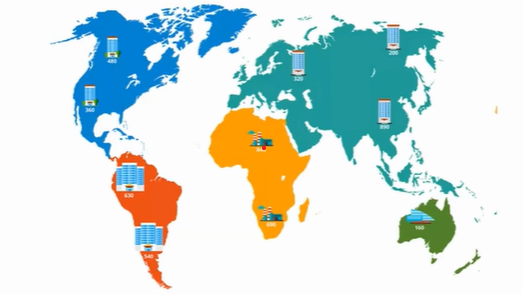
Handling multiple business units doesn’t have to be complicated. BC offers two solid approaches:
BC Everywhere: The All-In Approach
If you want full integration across all branches, BC keeps everything aligned by handling the following:

- Multi-currency & FX tools – Because dealing with exchange rates shouldn’t be a guessing game.
- Localization & multi-language support – Adapts to country-specific regulations while staying connected globally.
- Master data standardization – Ensures consistency, no matter where you operate.
Case Study: Global Automation Manufacturer Optimizes Operations with Business Central
Background
A large manufacturer of automation and control products operated multiple entities across different countries. Their legacy system, NAV 2009, created data silos, making it difficult to manage sales, finance, operations, and customer service across locations. They needed a cloud-based ERP solution to unify their global operations.
Challenges
- Disconnected Data: Each entity had isolated databases, leading to inefficiencies.
- Scalability Issues: The legacy system couldn’t support real-time insights or growth.
- Compliance & Localization: Each country had different regulatory requirements.
- Lack of Integration: No seamless connection between finance, sales, and operations.
Solution: Business Central Implementation
The company migrated to Microsoft Dynamics 365 Business Central, integrating multiple modules:
- Sales & Finance: Unified financial planning and reporting across all entities.
- Manufacturing & Warehousing: Streamlined production and inventory management.
- Multi-Currency & Multi-Language Support: Ensured compliance with local regulations.
- Integration with Salesforce: Enhanced customer relationship management.
Results
- 20% Reduction in Operational Costs through automation and efficiency.
- 30% Boost in Productivity by eliminating manual processes.
- 25% Increase in Data-Driven Decisions with real-time insights.
- Improved collaboration between global teams with a centralized system.
This transformation allowed the company to scale efficiently while maintaining compliance across multiple regions.
The Hub & Spoke Model: Best of Both Worlds
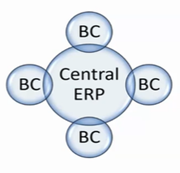
For businesses with a central ERP at HQ, BC serves as the operational platform for subsidiaries. It allows:
- Automated data extracts – No manual data entry – just smooth information flow.
- Corporate standards alignment – Common financial structures while accommodating local nuances.
- Cross-entity functionality – Seamless transactions between parent and child organizations.
Financial Reporting Without the Hassle
Forget about clunky reporting systems: BC keeps things simple with:
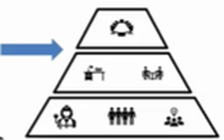
- No-code financial reports – Perfect for CFOs and finance teams who want quick insights.
- Excel template integration – Because, let’s be real, everyone loves Excel.
- Optimized KPI tracking – Power BI lets you set up custom scorecards to track business health.
The Bottom Line: Business Central is Built for You
Every business is different, but one thing’s for sure: efficiency, control, and intelligent insights are key to sustainable growth. Whether you’re running multiple entities, need consolidation, or just want better reporting, Business Central adapts to YOU.
And if you want to get the most out of your data, Power BI is here to transform the way you analyze and report.
Ready to simplify operations and drive smarter decisions? Let’s chat about how BC can work for your business!
Conclusion

Microsoft Dynamics 365 Business Central is more than just an ERP system; it’s a scalable solution designed to adapt to businesses of all sizes.
Whether you need streamlined financial reporting, automation, or seamless multi-entity management, BC provides the flexibility and intelligence to help you stay ahead. And when combined with Power BI, it transforms raw data into actionable insights, giving businesses real-time visibility into their operations.
No matter your company’s structure or growth trajectory, Business Central ensures you never outgrow your system, because it grows with you.
Ready to Explore The Future of Your Business with BC?
There are multiple benefits of transitioning to Business Central, and Microsoft demonstrates its commitment to the platform through regular updates. The Liberty Grove team of experts is here to help you understand how Business Central can optimize your operations – and ensure that it is right-sized for your organization.
Contact Liberty Grove for a complimentary consultation on how its team of experts can help configure Microsoft Dynamics 365 Business Central to your organization’s specific size and business requirements.
About Andrew Good

Andrew Good, CEO, Liberty Grove Software
Andrew Good, CEO of Liberty Grove Software, a leader in digital transformation, directs the company with strategic insights that deliver impactful results. With over two decades of expertise in Microsoft technologies, Andrew has guided businesses through digital transformation across manufacturing, finance, and healthcare.
Andrew’s extensive knowledge comes from personal experiences with various companies. His hands-on operational knowledge comes from Engineering, Maintenance, and operational roles at Unilever and Sony Music. Fourteen years of working with Microsoft Dynamics BC/NAV follows successful projects in ERP, Computerized Maintenance Management Systems (EAM), and quality systems.
His passion for technology is matched by his love for sailing, which inspires his leadership. Andrew parallels the precision of navigating the seas and the challenges of steering a successful company. Under his leadership, Liberty Grove Software thrives, offering tailored solutions to empower clients and optimize operations with innovative Microsoft-based systems.
Connect with Andrew on LinkedIn