
During my recent UST Education Series session, we walked through the highlights of the Business Central (BC) 2025 Wave 2 update, and it’s a big one. This release touches nearly every functional area of BC, from AI-powered Copilot features to improvements in financials, reporting, supply chain, and manufacturing.
Most importantly, it provides new ways to manage updates smarter, something every BC admin and partner cares deeply about.
After 24 years of helping organizations succeed with Microsoft Dynamics 365 Business Central, I’m still energized by every new release.
Microsoft’s twice-yearly updates reaffirm their commitment to continuous improvement: listening to customers, modernizing the platform, and giving us new tools to be more productive, more intelligent, and more adaptable.
Let’s take a closer look at what’s new, how updates will roll out, and the strategies I recommend for staying current without disrupting your business.
Update Rollouts: Staying Ahead Without Falling Behind
Microsoft remains consistent with its two major updates per year, typically landing in April and October, with preview features appearing earlier. But each organization controls when these updates go into production. That flexibility is powerful, and managing it well can give you confidence and peace of mind.
Here’s the approach I recommend (and use myself):
1. Establish a predictable testing window
Pick a week each cycle dedicated to reviewing preview features in your sandbox. Assign owners for finance, operations, and IT so nothing falls through the cracks.
2. Automate what you can
Business Central now offers better tools, like the Power Platform Connector for BC Environment Management, to help you spin up, refresh, and manage sandboxes more efficiently. Ensure your team has the necessary skills or resources to leverage these tools effectively so that you can maximize their benefits without delay.
3. Adopt early, but not first
Don’t wait until the last week of the update window; doing so risks rushed testing or unexpected conflicts. Aim for the middle of the rollout period to strike a balance between stability and innovation.
This strategic approach ensures you consistently benefit from Microsoft’s improvements without operational surprises.
What’s New in Business Central 2025 Wave 2
Wave 2 features enhancements that touch everyday workflows and long-term digital transformation goals, inspiring confidence that continuous innovation can drive your business forward.
Copilot: Bringing Intelligence Deeper Into BC
Payables Agent
This Copilot agent uses AI to help you manage vendor invoices. It identifies inconsistencies, recommends coding, and helps streamline the approval process. For AP teams, this is a practical, efficiency-boosting upgrade, not just AI for the sake of AI.
Auto Fill (with Bing Search)
Auto Fill can now draw from Bing Search to populate item details faster. If you’re onboarding new products, building catalogs, or managing frequently changing items, this saves real time.
Summarize
A favorite among first adopters, Copilot can now generate clear, human-readable summaries of records, helping busy users get up to speed immediately.
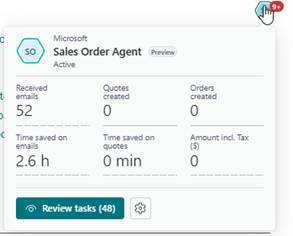
Agents (Preview)
This update is an exciting direction: agents that carry out tasks on your behalf. Early previews show promise in managing routine processes and in proactively suggesting actions.
Enhanced PO Line Matching
Improved intelligence means fewer mismatches and smoother purchasing workflows.
MCP (Model Context Protocol) Server
This enhancement deepens the integration between Business Central and AI models, enabling Copilot to interpret BC data with greater accuracy and context.
General Application Improvements
Wave 2 includes several updates that may not grab headlines, but they significantly improve usability and reliability.
New Accounts Payable Role Center
AP teams get a more intuitive, role-focused dashboard that puts tasks, insights, and actions front and center.
Concurrent Posting
This one’s a game changer for larger teams. You can now post more transactions simultaneously without collisions or delays.
Semantic Search
Searching in BC becomes much closer to how we naturally think. Instead of exact matches, BC now understands meaning and context.
Record Link Migration Tool
A welcome addition for implementations and upgrades; record links now migrate more reliably with the new tool.
Power Platform Connector for BC Environment Management
This feature strengthens automation opportunities for environment refreshes, notifications, approvals, and governance.
Sustainability Features
Microsoft continues to expand BC’s ability to support ESG initiatives, enabling more tracking and reporting without heavy customization.
Updated Contoso Coffee Demo App
This improved environment makes training and demonstrations much more realistic and modern.
eCommerce Enhancements (Shopify)
eCommerce continues to grow across industries, and Microsoft’s Shopify connector gets several improvements:
- Better troubleshooting tools to diagnose sync issues
- Linking salespeople to Shopify orders, improving reporting, and commissions
- Improved pricing synchronization, addressing one of the most common pain points
These updates reflect real-world customer feedback, making the integration smoother and more scalable.
Reporting Enhancements: Better Data, Better Decisions
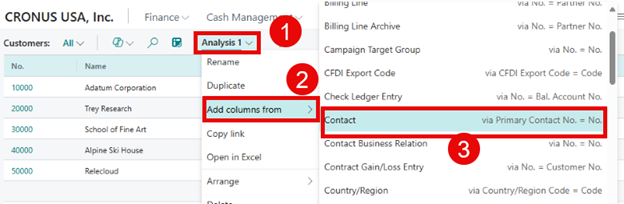
Reporting is one of the areas where we see meaningful improvements every release, and Wave 2 continues that pattern. Develop a strategy to evaluate which new features, such as Analysis Mode or Power BI report templates, align with your business goals and prioritize their adoption for maximum impact.
Analysis Mode – Now with Related Table Data
You can now pull related data directly into your analysis mode views, reducing the need for custom queries or external tools.
Audit Trail Report
Internal controls teams will appreciate this more precise and comprehensive audit trail.
Power BI Reports Are Now Open Source
That’s huge. Microsoft has made its Power BI report templates open source, enabling partners and customers to extend them with confidence.
Improved Financial Reporting
Smarter layouts, better usability, and improved flexibility make this area more approachable for finance teams.
Source Currency Code and Amount in General Ledger Entries
A minor enhancement with a significant impact for multi-currency organizations.
New Power BI Apps
These refreshed and expanded apps give organizations faster insights right out of the box:
- Purchasing (new!)
- Finance
- Sales
- Inventory
- Inventory Valuation
- Manufacturing
- Subscription Billing
- Sustainability
Each app brings stronger visualizations, better KPIs, and more actionable dashboards.
Supply Chain Improvements
Wave 2 includes several enhancements that make purchasing, sales, and inventory management more efficient:
Quality Management (Coming December)
A structured framework for managing inspections, quality checks, and nonconformances.
Sort Sales and Purchase Lines by Line Type
A simple but highly valuable usability improvement.
More Personalization Options
Users can now add additional fields and columns, tailoring pages to their workflow.
Manufacturing Enhancements

Manufacturers get meaningful upgrades this cycle:
Improved Subcontracting
Including:
- Better logistics for component movements
- Additional pricing options
- Expanded receiving that provides for item tracking and warehouse handling
- Improved visibility into subcontracting status
Quality Management (December 2025)
Microsoft is building a long-term roadmap for integrated quality processes.
Calculate Consumption – Set Defaults
This improvement supports more accurate production consumption calculations.
Final Thoughts: Staying Current Is a Competitive Advantage
Business Central 2025 Wave 2 reminds us why cloud ERPs are so powerful: continuous innovation, constant refinement, and new capabilities that businesses can adopt immediately.
But these updates only matter if you take advantage of them.
My advice after more than two decades working with BC:
Make staying current a strategic priority, not an afterthought.
The organizations that consistently benefit from Business Central are those that treat updates as opportunities, not disruptions.
Ready to Up Your Game with Business Central?
If you’d like help evaluating Wave 2 features, optimizing your update schedule, or exploring AI capabilities like Copilot, the Liberty Grove Software team is always here to help.
Let’s connect.Together, we can turn this update into a platform for your next stage of growth.
Here’s to making the most of what’s new in BC 2025 Wave 2; your future systems (and users!) will thank you.
About Andrew Good

Andrew Good, CEO, Liberty Grove Software
Andrew Good, CEO of Liberty Grove Software, a leader in digital transformation, directs the company with strategic insights that deliver impactful results. With over two decades of expertise in Microsoft technologies, Andrew has guided businesses through digital transformation across manufacturing, finance, and healthcare.
Andrew’s extensive knowledge comes from personal experiences with various companies. His hands-on operational knowledge comes from Engineering, Maintenance, and operational roles at Unilever and Sony Music. Fourteen years of working with Microsoft Dynamics BC/NAV follows successful projects in ERP, Computerized Maintenance Management Systems (EAM), and quality systems.
His passion for technology is matched by his love for sailing, which inspires his leadership. Andrew parallels the precision of navigating the seas and the challenges of steering a successful company. Under his leadership, Liberty Grove Software thrives, offering tailored solutions to empower clients and optimize operations with innovative Microsoft-based systems.